Integrations
Add Antiphona. Keep what already works.
You do not have to move everything at once. Start with one module. Connect the systems that you already trust. Move more when your parish is ready.
No wholesale move.
Keep your systems
Your current tools keep their jobs. Antiphona connects to them, so staff do not type the same record twice.
One module at a time
Turn on the module that solves your biggest problem first. Add the others later.
Your data stays yours
Reports and lists leave Antiphona as spreadsheets. You are never locked in.
Antiphona in the middle.
Solid lines are ready now. Teal dashed lines are coming soon. Gold dashed lines are systems that we connect for you.
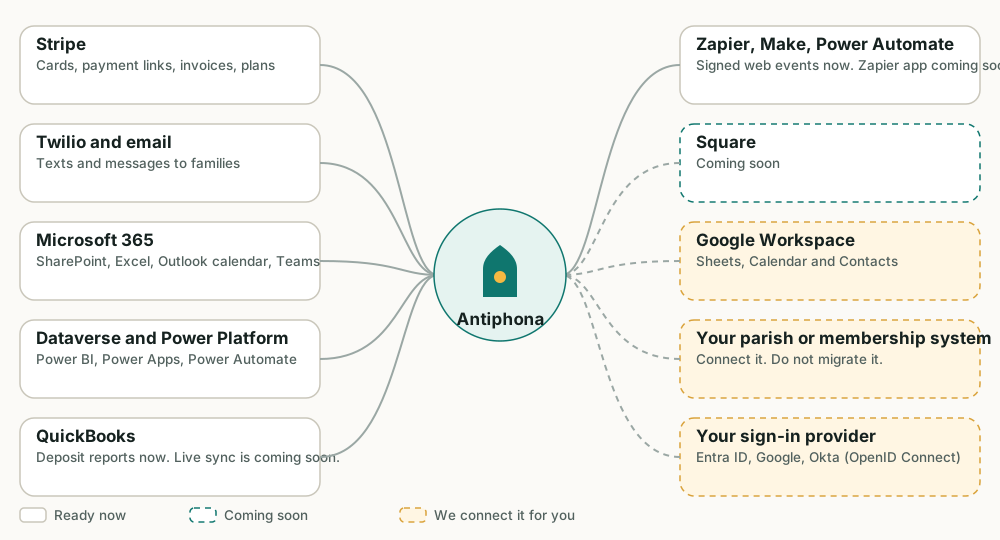
What is ready now, and what is coming.
Each system has a label, so you know what to expect.
Built in
- StripeCard payments, payment links, invoices and payment plans. Antiphona matches card sales to Stripe, charge by charge.
- Twilio and emailTexts and email follow each family's consent choices. Every message goes in a delivery log.
- Microsoft 365: SharePoint, Excel and OneDriveA form can add each answer to an Excel workbook or a SharePoint list as it arrives. The parish connects its own Microsoft account.
- Microsoft 365: Outlook calendarFamilies add a parent meeting to Outlook with one tap. Any event also downloads as a calendar file that Outlook, Google and Apple open.
- Microsoft Dataverse and the Power PlatformParish records live in Dataverse. With your parish's licences, Power BI, Power Apps and Power Automate can work with them.
- Web events for Zapier, Make, Power Automate and TeamsA form can send a signed web event to any address that accepts one. Zapier, Make and Power Automate all accept them. Power Automate can post the event to a Microsoft Teams channel. The send retries if the receiver is down.
- QuickBooks-ready reportsDeposit reports show which payments make up each bank deposit. Your bookkeeper can match them to QuickBooks.
- VerkadaDoor-unlock schedules for room bookings. Doors unlock for a booked room, and lock again after.
On the way
These are on the way. They will arrive as part of Antiphona, with no custom work.
- Microsoft 365, deeper: Outlook and TeamsSend parish mail from your Outlook mailbox, add events to shared calendars, and post alerts to a Teams channel with no flow in between.
- Zapier, through our secure APIA deep Zapier connection on the Antiphona API. Zaps can read parish events and act on them.
- QuickBooks syncPayments post to your books on their own, in place of a report that your bookkeeper matches.
- SquareFamilies pay with Square. Stripe stays a built-in choice.
Connected for you
We set these up with your parish.
- Other payment platformsFamilies pay on the platform that you prefer.
- SendGrid, Mailchimp and ZohoSend parish mail through the service your parish already uses.
- Google WorkspaceGoogle Sheets, Calendar and Contacts.
- Your parish or membership systemAntiphona reads and writes records there, so you keep one source of truth. No wholesale migration.
- Your sign-in providerMicrosoft Entra ID, Google or Okta, through OpenID Connect.
- Any system with an APIIf the system has an API, a connector can use it.
How we add a connection.
- 1
Name the system
Tell us what you use today and what slows your staff.
- 2
Agree what moves
We list which records go which way, and who can see them.
- 3
We build and test
You try it on a test copy of your parish.
- 4
Turn it on
Staff start to use it. We watch it with you.
A connector follows the same path as a custom module.
Which system should we connect first?
Email us the name of the tool. We will say what is built in and what we would build.